Sunday, 29 March 2015

How to play Words With Friends without annoying ads for FREE (and with an easy-to-use dictionary helper)

If you are sick and tired of having to watch extremely annoying video ads while playing Zynga Words With Friends on your mobile or tablet, there is a solution: play it on PC while you are working. The openness of the HTML5 platform along with the power of Chrome-based browsers, plus the enthusiasm of an ad-blocking plug-in developers will bring you the tranquility of playing the game completely free of ads. So the steps to get rid of the aggravating videos (and banners, too) are as follows:

  1. Create a fake Facebook account. Choose a good-looking pic for your profile - it will be displayed as your in-game avatar for those who play through Facebook, too.
  2. Run Words With Friends on your mobile or tablet. Open Settings, connect your game profile to the fake Facebook account you have created.
  3. Install Google Chrome or any browser that uses the same rendering engine, like Chromuim, Opera, etc.
  4. Install the Adblock Plus add-on into Chrome. Note: If you already have Chrome and a Facebook profile with a saved password, you can either install an additional browser (e.g. Chromium along with Chrome) or just open a private window (with Ctrl+Shift+N), and have fake Facebook opened there along with real one. 
  5. Go to ABP's settings, "Add your own filters" tab, click "Edit filters as raw text" link. Add the following strings to the list of the filters:

##div#RY_zyngaPassbackDiv
facebook.com###rightCol
facebook.com##._4-u2._2ph_._3-95
facebook.com##.fbDockWrapperRight
wwf-fb.zyngawithfriends.com##.fb_dialog
wwf-fb.zyngawithfriends.com##.fb_dialog_advanced
zyngawithfriends.com###wwf-dialog_phone_1426426288158
zyngawithfriends.com###wwf-unsupported-dialog
zyngawithfriends.com###zbar_promoInner


These will remove annoying promo dialogs, Zynga's graphic banners along with facebook chat window and ad sidebar. Now you can play pure WWF anytime by going to http://apps.facebook.com/wordswithfriends (you may want to add this to your bookmarks bar or speed dial or whatever).

If you want a really FAST dictionary of words eligible in Words With Friends along with definitions from Merriam-Webster and thefreedictionary.com, you can also download this simple FREE Windows application: Words With Friends Dictionary Helper. In addition to the dictionary, the program offers a little cheat (disabled by default): a list of all words in the game that include the word you've entered in it.
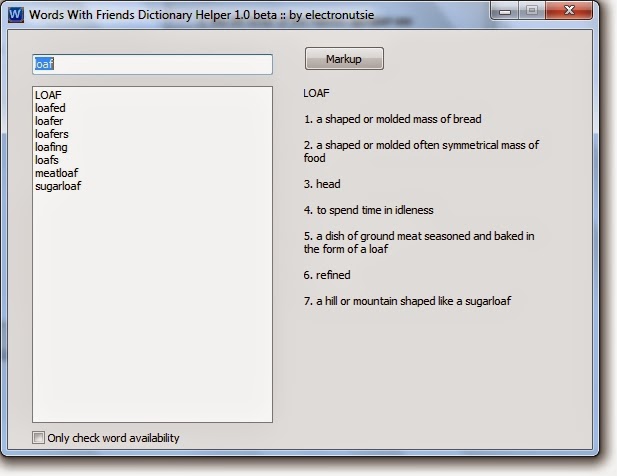

Now, you can play your favourite game completely without ads for FREE. Simple as that.

Saturday, 5 April 2014

Save space on your mobile device by removing cover art from music files

So I've got an 8 GB iPhone and I load it with lots of music. So I wondered what can be done to make the music take less space. As it turned out, many of my music files have cover art images embedded in them. Digging further I've discovered that 1) they often have way more resolution than is needed, and 2) the same cover image is almost always embedded in each and every one track of an album.

To remove the images from a music collection I intended to put onto my iPhone, I've used the freeware program taghycardia. The app offers to configure itself for "image stripping" from tags right when you install it.


Then it was literally a matter of a couple clicks.


I drag-n-dropped the root folder of my music collection weighing in at about 10 gigs onto the program's window, and once it scanned the tracks I pressed Apply Changes, and voila: the albums now take just 7 gigs total in size so now I can put most of them on my 8 Gb iPhone. 


Note: If you want to keep cover art, just check "Save as" checkbox in the program's options: removed cover images would be saved in their respective folders.

You can download the awesome app for free here: taghycardia.

Friday, 7 March 2014

FREE Words With Friends dictionary and helper

FREE Words With Friends dictionary helper: learn word eligibility AND definition instantly! Moreover, the dictionary lists all possible variations of the word you entered that are accepted by the game. It's not a cheat, right? Get it here.

Minimalistic and useful

Wednesday, 30 October 2013

How to disable the annoying Skype update notifications completely and forever

I just can't help sharing this: the extremely annoying update-your-version-of-Skype reminders CAN be disabled after all. Like many users, I've tried all "legitimate" ways to get rid of the pesky alerts, but whatever alert settings you change, they still pop up. Apparently, MS desperately wants us to download every update of Skype, which increasingly turns into bloatware.

However, the way to turn the reminders off does exist. Some users have noted that whenever a new version of Skype comes out, the program downloads it into a temp folder under the name SkypeSetup.exe. Upon finishing the download it pops up the aggravating alert, and does it again after every other action you perform in Skype. So the way to get rid of it is, basically, to create a file with the same name and make it read-only.


So, the steps to do it, method 1 (manual):

1. Go to the %TEMP% folder:

* Open any Windows folder
* Type %temp% in its path (address) bar
* Press Enter

2. Locate SkypeSetup.exe in the folder (if the file is not present, check out the %TMP% folder the same way) and delete the file

3. Create a dummy empty SkypeSetup.exe in the %temp% folder:

* Right click in the folder
* Select Create, Text document
* Type SkypeSetup.exe in the filename field
* Press Enter, and Ok the warning

4. Right click the file you have just created, select Properties, Security, Advanced, Change Permissions, Add

5. Type the word Everyone in the "Enter the object names" field, then press Ok

6. Now select Everyone, and check the "Full Control - Deny" checkbox. Press Apply, then Ok the warning question and the dialog.


There you go: from now on your Skype would be able neither to download its updates nor to display the maddening pop-up windows!


You can also do everything above with the method 2 (automatic):

1. Create a fixskype.bat file consisting of the following two lines:


NUL>%temp%\SkypeSetup.exe

Icacls.exe %temp%\SkypeSetup.exe /deny All:F

2. Run the batch file under an admin account. This one can also be helpful if you plan to re-create the updates-blocking file regularly (e.g., if you prefer to clear %TEMP% contents on every system startup).

Friday, 11 October 2013

Creating an M3U8 Unicode Playlist for Foobar2000

Why would one need Unicode playlists anyway? Well, I download lots of music, and not all of the artists and track names fit into the ASCII character set. There is not too many playlist creation programs out there, and some of the existing ignore folders with non-ASCII names, like this one:

Note the Unicode symbols in the folder's name and MP3 file names


Luckily, the latest version of the highly automated mp3 tagger taghycardia, which I already wrote about previously, comes to help: the version 0.99.3 has an integrated configurable Unicode Playlist Generator. Not only it recursively creates Unicode (.m3u8) playlists for MP3 folder trees, but also offers some useful options.


First, you can limit the number of tracks to include in a playlist from each album. Those could be either the first N tracks of a folder or N tracks chosen randomly from each of the folders.

Second, you can avoid including introductory tracks in playlists. Sometimes, the first track of an album is an "intro" that is intended by an artist to set the mood for what you are about to hear, but when you need to taste several albums quickly, you often don't have time or desire to listen to the prelude tracks. So, taghycardia's Playlist Generator is able to skip track #1 of an album while creating a list whenever the first song is called "Intro" or its duration is shorter than two minutes, which too could indicate it is being an introduction.

Note that in addition to Foobar, m3u8 playlists are supported by Media Player Classic, and a number of other other modern media playing software.

Friday, 20 September 2013

How to sniff all http web page requests in your home LAN using a stack of free software: my article at hubpages.com.

Tuesday, 25 June 2013

code + binary hosting?

I'm about to post an article at Hubpages.com on a solution to the problem of continuous HTTP requests monitoring in a home WLAN using Wireshark/tshark. The solution circumvents the issue of Wireshark's memory overuse and is completely based on freely available software. I just haven't decided yet where to host the source code and binary for a simple log analyzer that I've written for the solution. I need to place direct links to both the code and .exe in the article. Any suggestions?